> ## Documentation Index
> Fetch the complete documentation index at: https://agi-docs.pandas-ai.com/llms.txt
> Use this file to discover all available pages before exploring further.
# Architecture
> Understanding PandaAGI as a development framework for building and deploying agentic AI applications
## PandaAGI Architecture Overview
**PandaAGI** is a fully agentic execution ecosystem built for developers who want AI that **does** things, not just generates content. The system consists of **three core components**: the API, the SDK, and the execution environments.
Tasks routed to dedicated [general AI agents](/concepts/agents) optimized for specific roles
Tasks broken into subtasks that execute independently then merge
Automatic retries and reassignment for robust execution
Real-time [events](/concepts/events) for monitoring and response
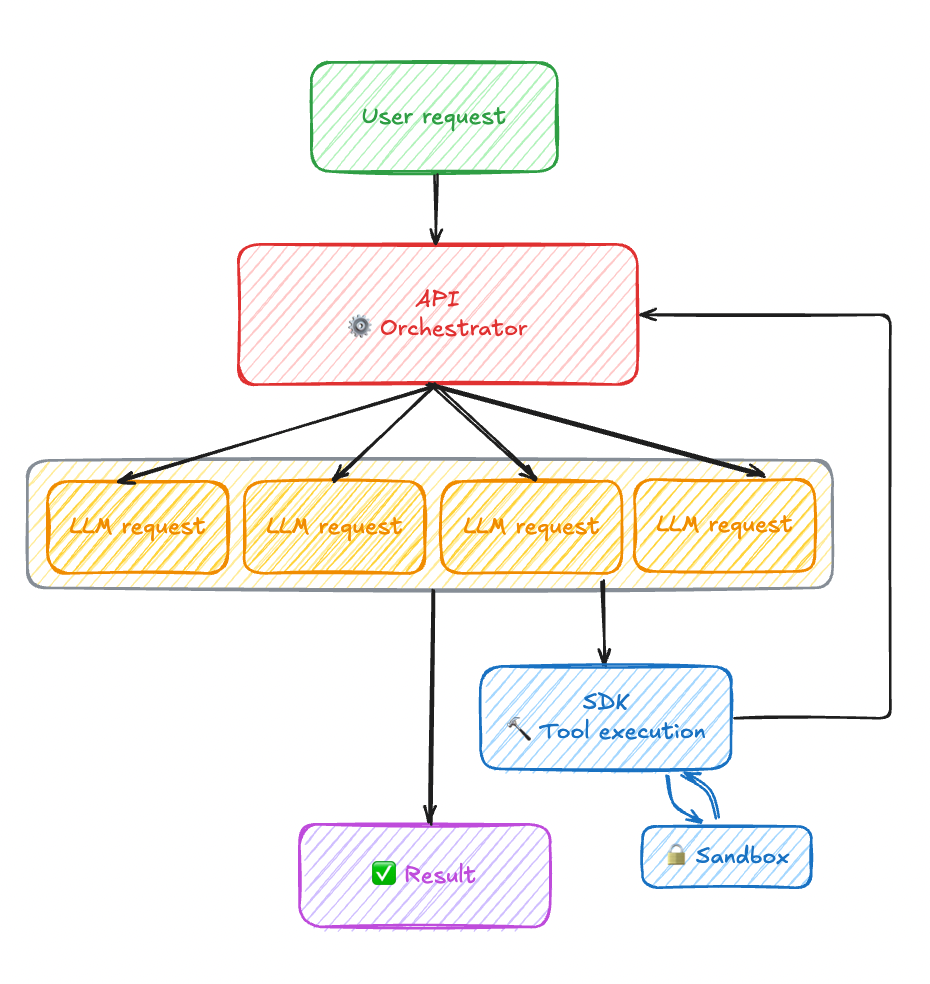 ## Separation of Concerns
Task understanding, planning, and orchestration of tool execution
Specific operations in the local environment (file operations, API calls)
User experience and business logic development
## The PandaAGI API
A **bidirectional WebSocket API** built for real-time, stateful interaction with your agents.
Unlike traditional REST APIs, the PandaAGI API keeps a live connection between your application and your agent—enabling:
Real-time updates as your agent works through tasks
Persistent context and memory across interactions
Send tasks, receive results, and monitor execution in-flight
Encrypted connections with API key authentication
Sign up and obtain your API key at [agi.pandas-ai.com](https://agi.pandas-ai.com)
```bash theme={null}
poetry add panda_agi
```
```bash theme={null}
export PANDA_AGI_KEY="your-api-key"
```
## The PandaAGI SDK
We don't believe developers should spend their time wiring sockets, managing agent state, or reinventing orchestration logic. The PandaAGI SDK exists to shift that burden away from you.
The SDK handles the complex infrastructure so you can focus on building powerful applications:
* Sets up secure, persistent socket connections
* Manages agent state across tasks
* Tracks tools and context
* Enables agents to reason, act, and adapt without manual glue code
Agents can search the web, navigate websites, and gather information from online sources
Read, write, and manage files and directories for asset management
Write and execute code dynamically to solve problems programmatically
Deploy web servers, APIs, and other services directly from the agent
```python theme={null}
from panda_agi import Agent, EventType, BaseHandler
from panda_agi.client.models import BaseStreamEvent
# Use event handler for real-time processing
class WebAppHandler(BaseHandler):
def process(self, event: BaseStreamEvent) -> None:
if event.type == EventType.THINKING:
print(f"Agent is thinking: {event.data}")
elif event.type == EventType.WEB_SEARCH:
print(f"Searching the web for: {event.data}")
# Handle other event types...
handlers = [WebAppHandler("WebAppBuilder")]
agent = Agent(environment=env, event_handlers=handlers)
response = await agent.run("Build me a simple web app")
```
All agent activities generate real-time [events](/concepts/events) that you can subscribe to for monitoring progress, collecting results, and responding to state changes.
Learn how agents work, their capabilities, and how to configure them for your needs
Discover how to use events for real-time monitoring and response in your applications
The general AI agents generate real-time events in their own execution environment.
## The Execution Environments
[General AI agents](/concepts/agents) that reason need a place to act. The [execution environment](/concepts/environments) is that space: a clean, isolated context where agents can safely operate.
Each environment is ephemeral, containerized, and independent—created for a single user or session
Run on the cloud, on your own hardware, or across both
Execution is local to the agent—self-contained, inspectable, and secure
Write and run code, store state, interact with external systems, and build mental models
Run agents in your local filesystem with the `LocalEnv` class. Perfect for development and testing.
```python theme={null}
from panda_agi import Agent
from panda_agi.envs import LocalEnv
# Create a local environment
env = LocalEnv(base_path="./my_workspace")
# Initialize agent with the environment
agent = Agent(environment=env)
```
Isolate agent execution in Docker containers with the `DockerEnv` class. Provides better security and reproducibility.
```python theme={null}
from panda_agi import Agent
from panda_agi.envs import DockerEnv
# Create a Docker environment
env = DockerEnv(workspace_path="./my_workspace")
# Initialize agent with the environment
agent = Agent(environment=env)
```
## Getting Started with PandaAGI
```bash theme={null}
# Using Poetry (recommended)
poetry add panda_agi
# Or with pip
pip install panda_agi
```
```bash theme={null}
# Set your API key
export PANDA_AGI_KEY="your-api-key"
```
```python theme={null}
from panda_agi import Agent
from panda_agi.envs import LocalEnv
from panda_agi.handlers import LogsHandler
# Create a local environment
env = LocalEnv(base_path="./my_workspace")
# Initialize agent with the environment
agent = Agent(environment=env)
# Run the agent with event handlers
handlers = [LogsHandler(use_colors=True, show_timestamps=True)]
response = await agent.run("Build me a simple web app", event_handlers=handlers)
print(f"Web app creation completed: {response.output}")
```
## Explore PandaAGI Components
Get up and running with PandaAGI in minutes
Learn about agent capabilities, configuration, and best practices
Understand the event-driven communication system
Explore execution environments and their capabilities
Use the command-line interface for quick prototyping
Build interactive chat applications with PandaAGI
## Separation of Concerns
Task understanding, planning, and orchestration of tool execution
Specific operations in the local environment (file operations, API calls)
User experience and business logic development
## The PandaAGI API
A **bidirectional WebSocket API** built for real-time, stateful interaction with your agents.
Unlike traditional REST APIs, the PandaAGI API keeps a live connection between your application and your agent—enabling:
Real-time updates as your agent works through tasks
Persistent context and memory across interactions
Send tasks, receive results, and monitor execution in-flight
Encrypted connections with API key authentication
Sign up and obtain your API key at [agi.pandas-ai.com](https://agi.pandas-ai.com)
```bash theme={null}
poetry add panda_agi
```
```bash theme={null}
export PANDA_AGI_KEY="your-api-key"
```
## The PandaAGI SDK
We don't believe developers should spend their time wiring sockets, managing agent state, or reinventing orchestration logic. The PandaAGI SDK exists to shift that burden away from you.
The SDK handles the complex infrastructure so you can focus on building powerful applications:
* Sets up secure, persistent socket connections
* Manages agent state across tasks
* Tracks tools and context
* Enables agents to reason, act, and adapt without manual glue code
Agents can search the web, navigate websites, and gather information from online sources
Read, write, and manage files and directories for asset management
Write and execute code dynamically to solve problems programmatically
Deploy web servers, APIs, and other services directly from the agent
```python theme={null}
from panda_agi import Agent, EventType, BaseHandler
from panda_agi.client.models import BaseStreamEvent
# Use event handler for real-time processing
class WebAppHandler(BaseHandler):
def process(self, event: BaseStreamEvent) -> None:
if event.type == EventType.THINKING:
print(f"Agent is thinking: {event.data}")
elif event.type == EventType.WEB_SEARCH:
print(f"Searching the web for: {event.data}")
# Handle other event types...
handlers = [WebAppHandler("WebAppBuilder")]
agent = Agent(environment=env, event_handlers=handlers)
response = await agent.run("Build me a simple web app")
```
All agent activities generate real-time [events](/concepts/events) that you can subscribe to for monitoring progress, collecting results, and responding to state changes.
Learn how agents work, their capabilities, and how to configure them for your needs
Discover how to use events for real-time monitoring and response in your applications
The general AI agents generate real-time events in their own execution environment.
## The Execution Environments
[General AI agents](/concepts/agents) that reason need a place to act. The [execution environment](/concepts/environments) is that space: a clean, isolated context where agents can safely operate.
Each environment is ephemeral, containerized, and independent—created for a single user or session
Run on the cloud, on your own hardware, or across both
Execution is local to the agent—self-contained, inspectable, and secure
Write and run code, store state, interact with external systems, and build mental models
Run agents in your local filesystem with the `LocalEnv` class. Perfect for development and testing.
```python theme={null}
from panda_agi import Agent
from panda_agi.envs import LocalEnv
# Create a local environment
env = LocalEnv(base_path="./my_workspace")
# Initialize agent with the environment
agent = Agent(environment=env)
```
Isolate agent execution in Docker containers with the `DockerEnv` class. Provides better security and reproducibility.
```python theme={null}
from panda_agi import Agent
from panda_agi.envs import DockerEnv
# Create a Docker environment
env = DockerEnv(workspace_path="./my_workspace")
# Initialize agent with the environment
agent = Agent(environment=env)
```
## Getting Started with PandaAGI
```bash theme={null}
# Using Poetry (recommended)
poetry add panda_agi
# Or with pip
pip install panda_agi
```
```bash theme={null}
# Set your API key
export PANDA_AGI_KEY="your-api-key"
```
```python theme={null}
from panda_agi import Agent
from panda_agi.envs import LocalEnv
from panda_agi.handlers import LogsHandler
# Create a local environment
env = LocalEnv(base_path="./my_workspace")
# Initialize agent with the environment
agent = Agent(environment=env)
# Run the agent with event handlers
handlers = [LogsHandler(use_colors=True, show_timestamps=True)]
response = await agent.run("Build me a simple web app", event_handlers=handlers)
print(f"Web app creation completed: {response.output}")
```
## Explore PandaAGI Components
Get up and running with PandaAGI in minutes
Learn about agent capabilities, configuration, and best practices
Understand the event-driven communication system
Explore execution environments and their capabilities
Use the command-line interface for quick prototyping
Build interactive chat applications with PandaAGI